

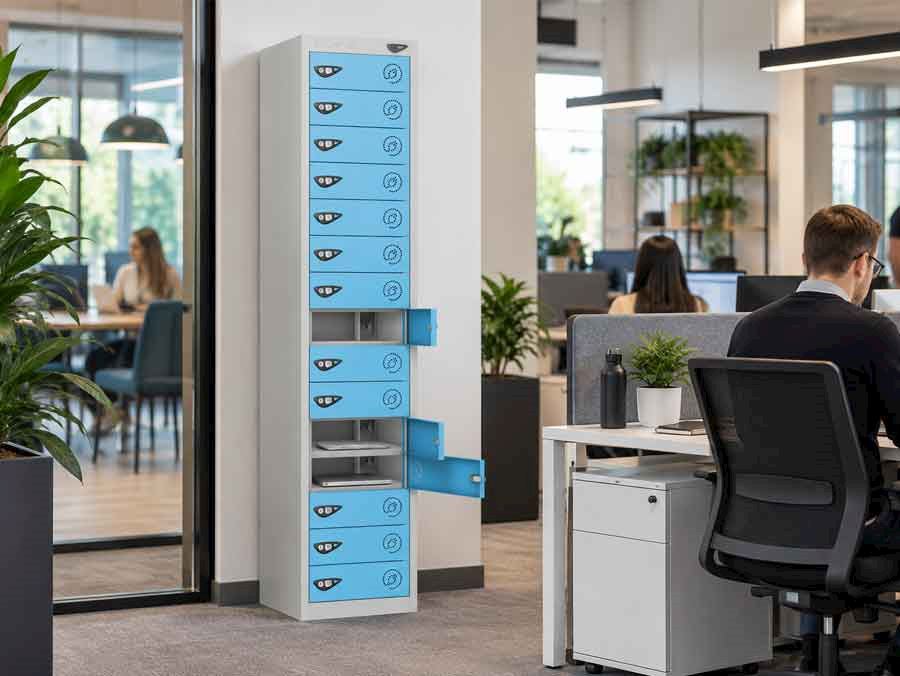
Laptops are an essential part of everyday office life. With more businesses adopting hybrid working and hot-desking, it is becoming increasingly important to find a safe and practical place to store laptops. But what is the best way to store laptops in an office? Should employees leave them out on their desks overnight? Is a locked cupboard secure enough? And are dedicated laptop lockers really necessary? The best solution depends on your office, how many laptops need storing and who needs access to them.
In this blog, we will explore the different ways to store laptops at work, common mistakes to avoid and how to keep valuable laptops secure and ready to use.
Why Is Secure Laptop Storage Important In An Office?
Laptops can be an expensive business asset containing important company information, confidential documents and access to workplace systems. Storing laptops incorrectly can create several problems.
Theft and security risks
Laptops are portable so relatively easy to remove from an office. Even workplaces with controlled building access can benefit from additional secure storage, particularly where visitors, contractors or multiple departments share the same space.
Accidental damage
A laptop left on a busy desk can easily be knocked over, scratched or damaged by spilled drinks. Stacking several laptops together in a cupboard can also cause unnecessary wear and damage.
Cluttered workspaces
Offices can quickly become untidy when laptops and charging cables are left out on desks. Providing designated storage helps to keep working areas organised.
Poor equipment management
For businesses that share laptops between employees, having a system in place to know exactly where each device is stored can make life easier for employees and office managers.
Should Employees Leave Laptops On Their Desks Overnight?
It is common for employees to leave their laptops on their desks at the end of the working day. Especially in offices where everyone has an assigned workstation. However, leaving laptops unattended overnight isn't always the safest option. Even if your office has locked doors, alarms and CCTV, these measures don't necessarily prevent someone with building access from removing or interfering with equipment. There is also the risk of accidental damage from cleaners, maintenance teams or other employees using the workspace outside normal working hours.
For hot-desking offices, leaving laptops on desks can create another problem. The next employee may arrive to find a workstation occupied by someone else's equipment. A better solution is to provide employees with a secure place to store their laptops when they are not being used. For smaller offices, this might be a lockable desk or cupboard. For larger workplaces, individual laptop lockers can provide a more organised alternative.
What Is The Best Way To Store Laptops At Work?
There are lots of storage solutions that work for various types of business. The best option depends on the number of laptops, how frequently they are used and whether employees need individual or shared storage.
Here are some of the most common options.
1. Lockable Desk Drawers and Pedestals
Lockable desk drawers are a straightforward solution for employees who have permanent workstations. You can store laptops and personal belongings close to the desk without needing a separate storage area. However, they aren't always practical in modern offices. Many businesses now use shared desks, meaning employees don't have a permanent workstation or dedicated drawer. Desk pedestals can also take up valuable floor space and may not accommodate larger laptops or accessories.
Best suited to: Smaller offices with permanently assigned desks.
2. Lockable Office Cupboards
A lockable office cupboard can be a cost-effective way to store several laptops in one central location. This may work well for small businesses or departments where only a few devices need to be stored overnight. The main drawback is organisation. If laptops are stacked together or employees share access to the same cupboard, equipment can become mixed up, damaged or difficult to locate. A cupboard also offers limited individual access.
Best suited to: Small offices with a limited number of shared laptops.
3. Laptop Storage Trolleys
Laptop trolleys are often used by IT departments, training centres and businesses managing multiple devices. They provide centralised storage, with individual or shared access and built-in charging facilities. Mobile laptop trolleys can be particularly useful when equipment needs moving between rooms.
Best suited to: IT departments, training facilities and businesses managing shared equipment.
4. Individual Laptop Lockers
For offices where employees need secure, convenient access to their laptops, dedicated laptop lockers are often one of the most popular solutions. Unlike shared cupboards, laptop lockers provide individual compartments, allowing employees to store their devices separately. This helps prevent laptops from being stacked together, reduces clutter and provides a designated storage space for each user.
Laptop lockers are particularly useful in offices with:
-
Hot-desking and flexible working arrangements
-
Employees who leave laptops at work overnight
-
Shared or loan laptops
-
Limited desk storage
-
Multiple departments using the same workspace
Depending on the model, laptop lockers can also be supplied with different locking options to suit how the office operates.
Best suited to: Modern offices, hybrid workplaces and businesses requiring individual secure laptop storage.
What Is The Best Way To Store Multiple Laptops?
If your business needs to store several laptops, organisation becomes just as important as security. For example, an IT department managing 30 laptops may need a completely different solution from an office where 30 employees each require somewhere to store their own device. For shared company laptops, a centralised laptop locker with single door access or 2 door laptop trolley may be suitable, particularly if devices are issued and returned by an IT administrator or office manager.
For individually assigned laptops, a laptop locker with separate compartments can make more sense. Employees can access their own devices without having to rely on another member of staff to unlock the storage area. Dedicated compartments also make it easier to allocate specific storage spaces and keep equipment organised.
Before deciding, you will need to consider how frequently laptops are accessed and whether users need independent access. Also, whether the user needs to be able to charge their laptop while not in use.
Are Laptop Lockers Secure?
One of the most common concerns businesses have is whether laptop lockers are secure enough to store expensive laptops. A well-made laptop locker can provide an effective barrier against unauthorised access, but the level of security depends on several factors.
Locker construction
Strong steel construction, robust doors and quality hinges are important features to look for. Lockers intended for regular workplace use should be able to withstand repeated opening and closing.
Locking system
Different workplaces require different locking arrangements. Key locks may be suitable for employees who have permanently assigned lockers. While combination or electronic locks can be more effective for shared-use environments.
Locker positioning
Even a strong locker should be installed in a suitable location. Positioning lockers in an accessible but appropriately controlled area can help improve security.
Installation
Where required by the manufacturer and site conditions, lockers should be securely fixed to prevent movement or tipping. It is also important to remember that physical laptop storage is only one part of workplace security. Businesses should still use appropriate device encryption, passwords and IT security policies to protect company information.
Do Laptops Need Ventilation When Stored?
Yes ventilation is very important, particularly when laptops are being charged while in storage. Laptops can generate heat during operation and charging and excessive heat can affect battery performance. For laptops being stored without charging, it's generally best to shut them down fully and allow them to cool before putting them away.
If laptops will be charged inside lockers, consider a locker like Pure 15 Door Laptop Locker which has ventilation holes in each door.
Should You Charge Laptops While They Are In Storage?
This depends on how your business uses its laptops. For employees who use their own assigned laptops throughout the day, standard secure storage may be all that's required.
However, businesses operating shared laptop schemes may benefit from charging facilities. For example, an IT department could return laptops to a charging locker at the end of the working day. The laptop can then be put on charge while being stored away, helping ensure they are ready for the next user.
Laptop charging lockers can be particularly useful for:
-
Businesses with shared or loan laptops
-
IT departments managing multiple devices
-
Training rooms and meeting facilities
-
Workplaces where laptops are used across different shifts
Before purchasing charging lockers, consider the electrical requirements of your devices, the available power supply and whether the charging system is compatible with your equipment. Most laptop lockers have various charging options including 3 pin plugs, USB A and USB C connections.
What Is The Best Laptop Storage Solution For Hybrid Offices?
Hybrid working has changed how many businesses use their office space. Instead of every employee having a permanent desk, workstations are often shared between different people throughout the week. This can make traditional desk drawers and pedestals less practical. So where should employees store their laptops when they are not using them? Laptop storage lockers offer a convenient solution for hybrid offices. They provide a dedicated storage area without tying employees to a particular workstation.
There are two main approaches.
Individually assigned lockers
Each employee has their own compartment, which they can use whenever they are in the office. This works well for businesses where staff regularly leave their laptops and accessories on-site.
Shared-use lockers
Employees use an available locker for a temporary period, rather than having one permanently assigned. This can work particularly well in hybrid offices where attendance changes throughout the week. For example, a business with 100 employees but only 40 people regularly attending on the same day may not need 100 permanently assigned laptop lockers.
Looking for Secure Laptop Storage for Your Office?
At 3D Lockers, we understand that every workplace has different storage requirements. If you are considering laptop lockers but aren't sure which type is most suitable, take a look at our Which Laptop Locker Is Right for You? useful guide. It explains all the different options available and helps you find a practical laptop storage solution for your business.
Alternatively, contact the team at 3D Lockers for friendly advice on your office laptop storage requirements.